#Writing a Rubric
A rubric is the grading specification for a module. It tells the autograder which commands to run on the student's VM and how to convert the output into points. You author it in the rubric editor on the module's library page.
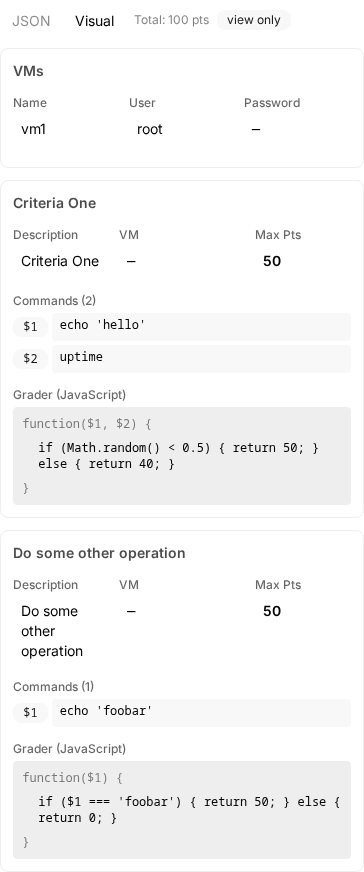
#Anatomy
A rubric has two parts:
- VM credentials. The username and password the autograder uses to log in. With one VM, you supply a single user and password. With multiple VMs, you list each VM by name and give each its own credentials. The names must match the VM names in the module manifest.
- Scoring components. An ordered list. Each component is one criterion that runs independently and contributes points to the total.
#Component fields
Every component has four fields.
| Field | What it is |
|---|---|
description | Short label shown to the student and the teacher. Make it specific so a glance tells you what is being checked. |
maxPoints | The score awarded when the criterion fully passes. |
commands | A list of shell commands to run on the VM. The output of each command is captured and handed to the grader. |
grader | A snippet of JavaScript that decides how many points to award. |
In a multi-VM rubric, each component also has a vm field naming which VM its commands run on.
#The grader function
Each command's standard output is passed to your grader as a positional argument: the first command becomes $1, the second $2, and so on. The grader runs as the body of a function and must return a finite number. That number is the points awarded for the component, capped at maxPoints.
return $1.includes('OK') ? 25 : 0;
A few rules to keep in mind:
- If a command exits non-zero, its argument is the literal string
'NONZERO_EXIT_CODE'instead of stdout. Test for that explicitly when a failing command should still produce a graded result. - The grader runs in an isolated sandbox. There is no
console, no network, no filesystem, noprocess. Built-ins likeMath,RegExp,JSON, andNumberare available. - Limits: 250 ms of CPU time and 16 MB of memory per component. A grader that times out or returns anything other than a finite number scores zero and surfaces the error in the result.
- Partial credit is fine. Return any value between
0andmaxPoints.
#Single VM vs. multiple VMs
Use the single-VM form when the entire module runs on one machine. Use the multi-VM form when the lesson involves a client and a server, two roles in a network exercise, or any setup where commands must reach different hosts. The autograder dispatches each component's commands to the named VM.
#Examples
#Example 1: a single check on one VM
A simple criterion: did the student leave the file at /etc/motd containing the word welcome?
{
	"user": "student",
	"password": "rudder",
	"rubric": [
		{
			"description": "MOTD contains a welcome message",
			"maxPoints": 10,
			"commands": ["cat /etc/motd"],
			"grader": "return $1.toLowerCase().includes('welcome') ? 10 : 0;"
		}
	]
}
#Example 2: combining multiple commands and partial credit
Two commands feed one component. The grader awards full credit when both checks pass and half credit when only one does.
{
	"user": "student",
	"password": "rudder",
	"rubric": [
		{
			"description": "SSH service is enabled and listening on port 22",
			"maxPoints": 20,
			"commands": ["systemctl is-enabled ssh", "ss -tlnp | grep ':22 '"],
			"grader": "var enabled = $1.trim() === 'enabled'; var listening = $2.includes(':22'); if (enabled && listening) return 20; if (enabled || listening) return 10; return 0;"
		}
	]
}
#Example 3: a multi-VM rubric
A client and a server. The server must serve content on port 80, and the client must be able to reach it.
{
	"vms": [
		{ "name": "server", "user": "admin", "password": "rudder" },
		{ "name": "client", "user": "user", "password": "rudder" }
	],
	"rubric": [
		{
			"vm": "server",
			"description": "nginx is running on the server",
			"maxPoints": 15,
			"commands": ["systemctl is-active nginx"],
			"grader": "return $1.trim() === 'active' ? 15 : 0;"
		},
		{
			"vm": "client",
			"description": "Client can fetch the homepage from the server",
			"maxPoints": 15,
			"commands": ["curl -s -o /dev/null -w '%{http_code}' http://server/"],
			"grader": "return $1.trim() === '200' ? 15 : 0;"
		}
	]
}
#Tips
- Prefer commands that produce a small, predictable output. Match against a single token rather than parsing a paragraph.
- Use regular expressions when the output varies but follows a pattern.
- Keep components independent. A failing first component should not break a later one.
- Write the description from the student's perspective. "Firewall blocks inbound port 23" reads better than "iptables rule check 1".
- When a rubric misbehaves at runtime, see Troubleshooting.