#Sources
Every VM needs exactly one source: the disk image it boots from at the start of the build. There are three common options to choose between, and one extra option exposed only in the YAML manifest.
#Disk Image URL
Pull a disk image from any HTTP/HTTPS URL. Best for cloud images (qcow2 from Debian, Ubuntu, Fedora, Rocky, AlmaLinux, etc.). The VM boots directly from this image, no ISO install or provisioning required before SSH comes up.
In the editor: in the VM's Source section, pick Disk Image URL and paste the URL.
source:
    url: 'https://cloud.debian.org/images/cloud/bookworm/latest/debian-12-genericcloud-amd64.qcow2'
The URL is fetched once per build. Pin to a specific date or release if you need reproducibility (/bookworm/20250214-2056/ instead of /bookworm/latest/).
#ISO Install
Empty disk; you install the OS from an ISO. Required for Windows and any Linux distro that does not ship a cloud image.
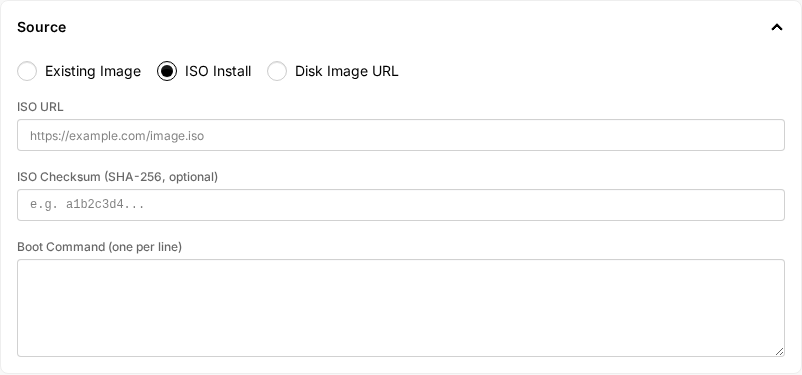
In the editor: in the VM's Source section, pick ISO Install, then fill ISO URL and (recommended) ISO Checksum (SHA-256). Use Boot Command to type keystrokes at the installer (see Boot commands). Use the File Delivery matrix below it to mark which entries from the top-level Files section should be on the virtual floppy or served over HTTP during install.
source:
    blank: true
isos:
    - url: 'https://cdimage.debian.org/cdimage/.../debian-12.9.0-amd64-netinst.iso'
      checksum: '1257373c706d8c07e6917942736a865dfff557d21d76ea3040bb1039eb72a054'
disks:
    - name: rootdisk
      size: '25Gi'
checksum is optional but strongly recommended. ISOs are cached by checksum: if you reuse the same ISO across builds, only the first one downloads it.
Disks are capped at 50 GiB. This first entry is the boot disk and receives the installed OS; to add a data disk, list it after the boot disk. See What disks means depends on the source.
#Existing Image (layered builds)
Source from another build's output. The disk is whatever the referenced build captured. See Layered builds for the full pattern.
In the editor: in the VM's Source section, pick Existing Image, then pick a base module from the Base Image dropdown. If the base module has more than one VM, a VM picker appears so you can choose which of its template VMs to layer on.
The dropdown lists modules your organization owns that are tagged Base Image, modules shared to you at maintainer level, and modules shared to you at consumer level that their owner tagged Base Image. In every case the module needs a stable build in your deployment zone, which is the usual reason an expected base is missing from the list. See Bases you do not own.
source:
    build_ref:
        name: base-debian
        vm_name: builder # required if base build has multiple VMs
Every disk on the base VM is inherited automatically — boot disk and any secondary data disks, content included. You don't need to, and can't, re-declare a data disk to keep it; it just carries over. Anything you list here is an additional disk, appended after the inherited ones. Naming it the same as an inherited disk (boot or secondary) is a hard error, not a way to override it.
#container_disk
Use a container image as a disk. Useful for community-maintained images published in the container_disk format. This option is reachable only by editing the YAML directly.
source:
    container_disk: 'quay.io/containerdisks/fedora:39'